# Product with Image

In the theme editor **(Customize) => Section**, Add **Product with Image**

<figure><img src="https://3949671186-files.gitbook.io/~/files/v0/b/gitbook-x-prod.appspot.com/o/spaces%2Fou66zlGuL81AP7Hl5Ehv%2Fuploads%2FMyO0zVfk907wVy8dj2qL%2Fss_imgpro.png?alt=media&#x26;token=6f22cdd8-b587-4160-8c93-b313ca9efd1a" alt=""><figcaption></figcaption></figure>

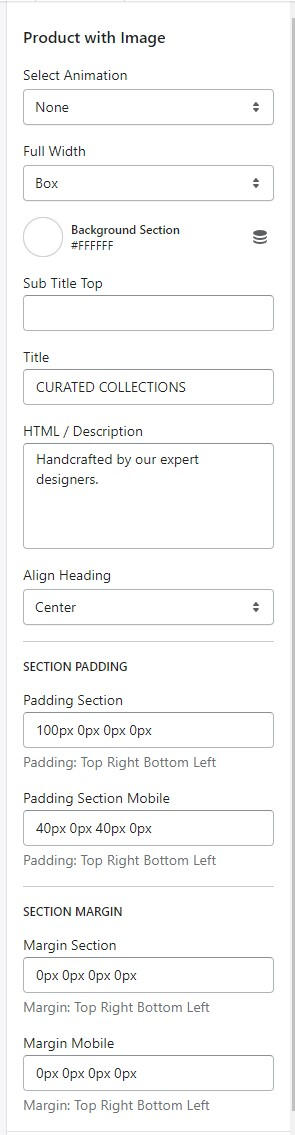
### General Settings

<figure><img src="https://content.gitbook.com/content/ou66zlGuL81AP7Hl5Ehv/blobs/n4BuhHeobALjgbHGK4Gs/image.png" alt=""><figcaption></figcaption></figure>

* Select Animation
* Width of Container
* Background Section
* Text content, Sub Title, Heading, Description
* Align Heading
* Section Padding (Desktop on Mobile)

### Block Settings

{% hint style="success" %}
In **Product with Image** Section **>** Click **Banner**
{% endhint %}

![](https://content.gitbook.com/content/ou66zlGuL81AP7Hl5Ehv/blobs/8aoHFGZAKaUy2m646fKf/image.png)![](https://content.gitbook.com/content/ou66zlGuL81AP7Hl5Ehv/blobs/EEqHQsixid6xgx53fO74/image.png)

* Text content, Sub Title, Heading, Description
* Heading Size
* Text Position
* Button text 1
* Button Link 1
* Style Button 1
* Image
* Link Video
* Color
* Overlay color
* Image overlay opacity

{% hint style="info" %}
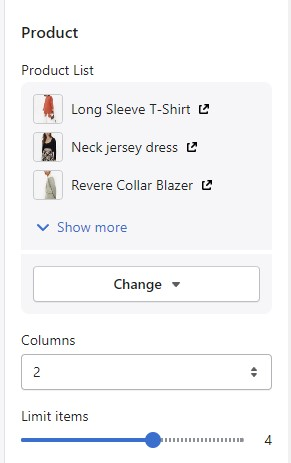
In **Product with Image** Section **>** Click **Product**
{% endhint %}

<figure><img src="https://content.gitbook.com/content/ou66zlGuL81AP7Hl5Ehv/blobs/6qp6rR1r9Eyddw1fM2gm/image.png" alt=""><figcaption></figcaption></figure>

* Select Product List
* Columns
* Limit items