# Search Page

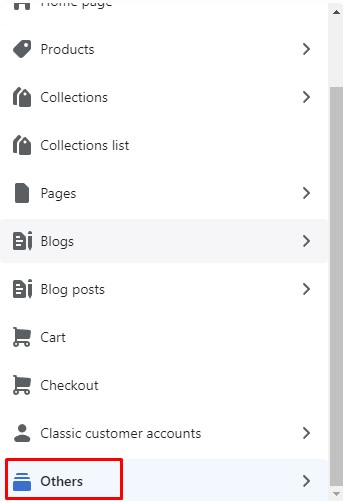
* In the theme editor (**Customize**), open the template selector
* Select **Others**, then **Search**

<figure><img src="https://content.gitbook.com/content/ou66zlGuL81AP7Hl5Ehv/blobs/ZHvJalT3geCjnXRjRzGc/image.png" alt=""><figcaption></figcaption></figure>

<figure><img src="https://3949671186-files.gitbook.io/~/files/v0/b/gitbook-x-prod.appspot.com/o/spaces%2Fou66zlGuL81AP7Hl5Ehv%2Fuploads%2FaHwVe3RYKAdik8VUKyBf%2Fss_search_re&#x27;.png?alt=media&#x26;token=bf6232de-f4f8-4c95-83c4-399d9b2b629f" alt=""><figcaption></figcaption></figure>

### General Settings

{% hint style="success" %}
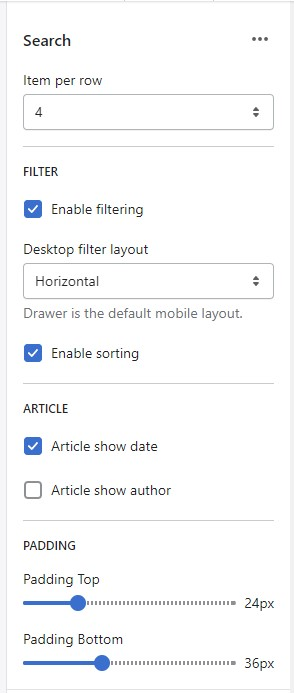
In **Search page** -> Click **Search Section**
{% endhint %}

<figure><img src="https://content.gitbook.com/content/ou66zlGuL81AP7Hl5Ehv/blobs/MCu1Mz2VPxwRf4PJzpv1/image.png" alt=""><figcaption></figcaption></figure>

* Item per row
* Enable filtering
* Desktop filter layout
* Enable sorting
* Button Text
* Button Link
* Article show date
* Article show author
* Padding Top
* Padding Bottom