# About us v1

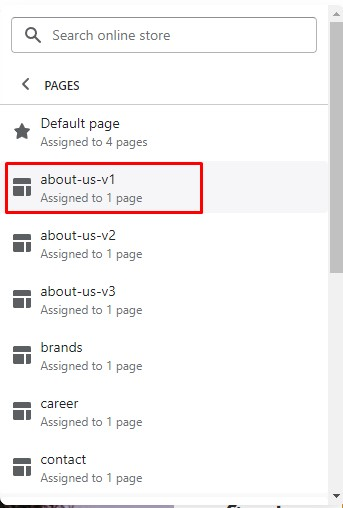
* In the theme editor (**Customize**), open the template selector
* Select **Pages**, then **about-us-v1**

<figure><img src="https://content.gitbook.com/content/ou66zlGuL81AP7Hl5Ehv/blobs/rFSXewaXDP1aclsXQc3E/image.png" alt=""><figcaption></figcaption></figure>

You can add any section that is listed in Theme sections.&#x20;

<figure><img src="https://3949671186-files.gitbook.io/~/files/v0/b/gitbook-x-prod.appspot.com/o/spaces%2Fou66zlGuL81AP7Hl5Ehv%2Fuploads%2FXKBCIi1tmd3YtVAf8uaY%2Fss_ab1.png?alt=media&#x26;token=487dfbc3-552f-46e5-b33e-21749c7ebb35" alt=""><figcaption></figcaption></figure>

### How to active page?

{% hint style="info" %}

1. From your Shopify admin, go to **Online Store** **->** **Pages.**
2. Click **Add page**.
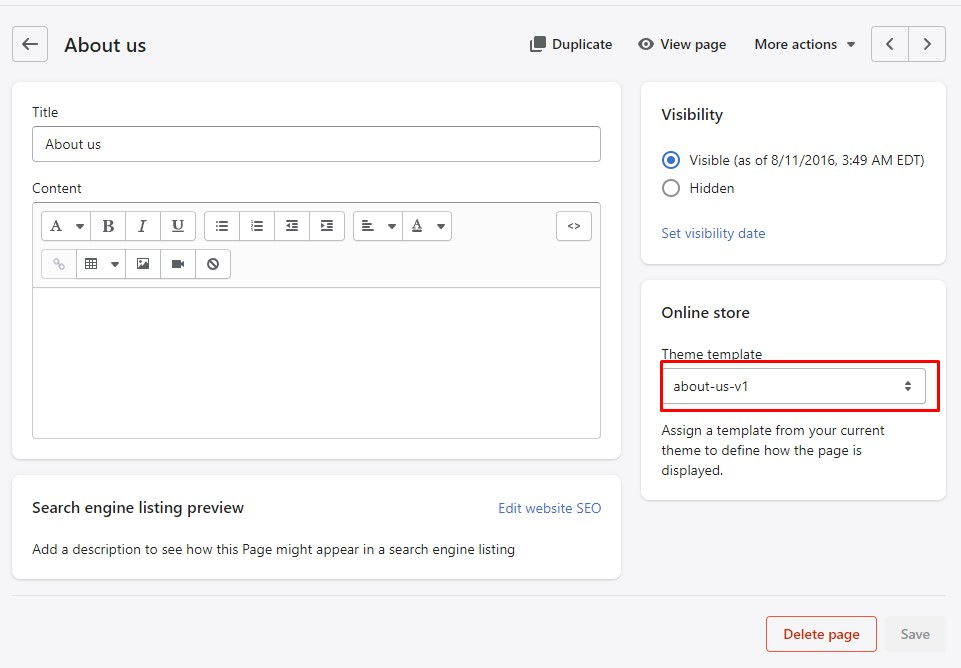
3. Enter a title. After that, choose the **Theme template** like the below image.
4. Click **Save**.
   {% endhint %}
<figure><img src="https://content.gitbook.com/content/ou66zlGuL81AP7Hl5Ehv/blobs/VlgJEPPxkEIMxueLzbGC/image.png" alt=""><figcaption></figcaption></figure>