# Hot Spots Split
In the theme editor **(Customize) => Section**, Add **Hot Spots Split**
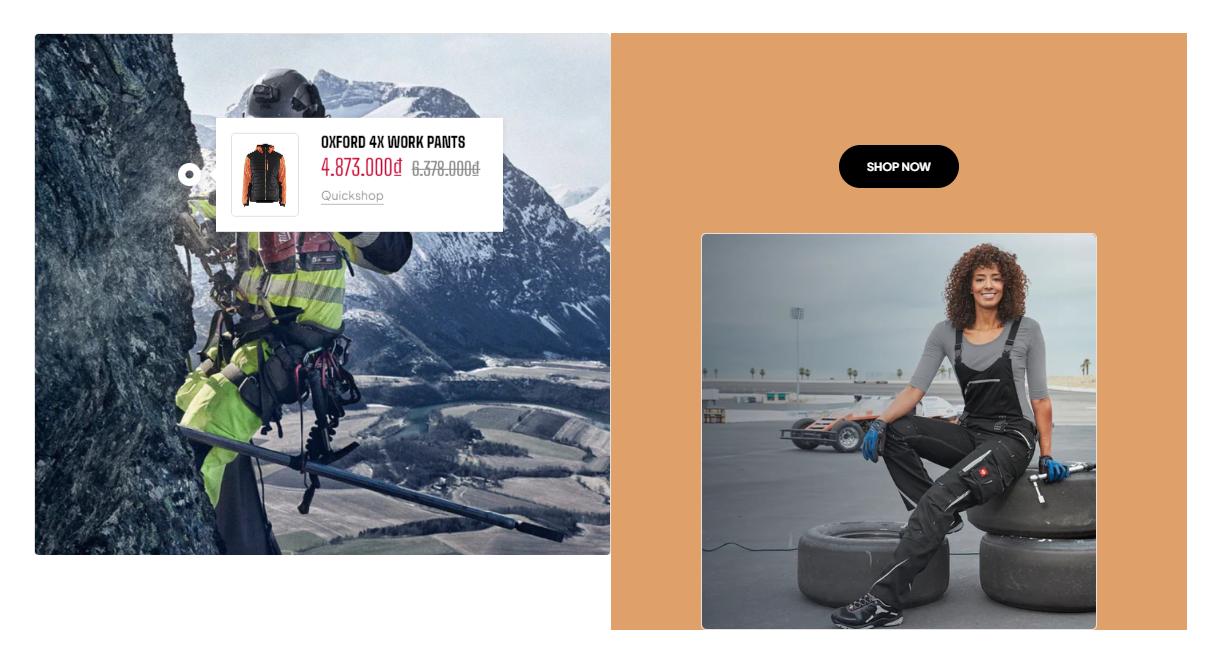 ### General Settings
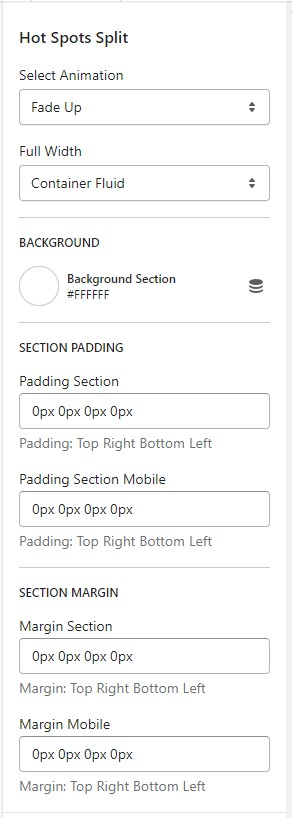 * Select Animation
* Width of Container
* Background
* Section Padding (Desktop on Mobile)
### Block Settings
{% hint style="success" %}
In **Hot Spots Split** Section **>** Add **Feature Hotspot**
{% endhint %}

* Column width
* Image
* Image Mobile
* Column same height
* Product 1
* Select product
* Position Product
* Horizontal position
* Vertical position
* Horizontal position (mobile)
* Vertical position (mobile)
* Product 2
* Vertical position (mobile)
* Horizontal position (mobile)
* Vertical position
* Horizontal position
* Position Product
* Select product
* Product 3
* Vertical position (mobile)
* Horizontal position (mobile)
* Vertical position
* Horizontal position
* Position Product
* Select product
* Select Animation
* Width of Container
* Background
* Section Padding (Desktop on Mobile)
### Block Settings
{% hint style="success" %}
In **Hot Spots Split** Section **>** Add **Feature Hotspot**
{% endhint %}

* Column width
* Image
* Image Mobile
* Column same height
* Product 1
* Select product
* Position Product
* Horizontal position
* Vertical position
* Horizontal position (mobile)
* Vertical position (mobile)
* Product 2
* Vertical position (mobile)
* Horizontal position (mobile)
* Vertical position
* Horizontal position
* Position Product
* Select product
* Product 3
* Vertical position (mobile)
* Horizontal position (mobile)
* Vertical position
* Horizontal position
* Position Product
* Select product